


What is PB SecureSign?
PB SecureSign is an easy and secured way to authenticate transactions by using biometric recognition or 6-digit SecurePIN.
This feature will bind your device with your PBe User ID for enhanced security. Only one of your registered device can be activated with PB SecureSign.
Register and Activate PB SecureSign
Register and Activate PB SecureSign via MyPB App

Input your ID no. to proceed with PB SecureSign registration.

Enable and Set your Quick Payment Limit.

Perform 2-factor authentication using SecureSign Token to confirm your registration.

Activation done!
Your PB SecureSign will be activated after 12 hours.
Register and Activate PB SecureSign via MyPB App
Step 1: Register PB SecureSign

Input your ID no. to proceed with PB SecureSign registration.
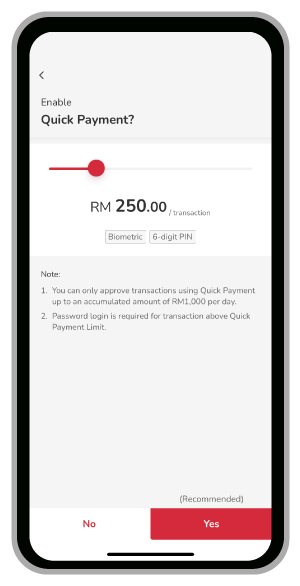
Enable and Set your Quick Payment Limit.

Perform 2-factor authentication via SMS PAC to confirm your registration.

Registration done!
Proceed to Step 2 below to activate your PB SecureSign.
Step 2: Activate PB SecureSign
Option 1
Activate PB SecureSign via
Public Bank ATM / CRM
Activate PB SecureSign via Public Bank ATM/CRM
Visit any of our Automated Teller Machines (ATMs) to Activate PB SecureSign.
Step 1
Select "Other Services"

Step 2
Select "PB secureSign Activation"

Step 3
Select "Yes" or "No" to activate the PB SecureSign.

Step 4
Transaction Accepted. Remove Card and collect the Advice Slip.

Step 5
Transaction completed. Advice Slip is generated.

Option 2
Activate PB SecureSign via Branches
Please bring your Identification Documents (NRIC / Passport) to complete biometrics verification at customer service counter in any Public Bank Branches.
Note: In order to further safeguard your online banking, PB SecureSign can only be used to approve transactions 12 hours after activation.
Register and Activate PB SecureSign via MyPB App
Input your ID no. to proceed with PB SecureSign registration.
Enable and Set your Quick Payment Limit.
Perform 2-factor authentication using SecureSign Token to confirm your registration.
Activation done!
Your PB SecureSign will be activated after 12 hours.
Register and Activate PB SecureSign via MyPB App
Step 1: Register PB SecureSign
Input your ID no. to proceed with PB SecureSign registration.
Enable and Set your Quick Payment Limit.
Perform 2-factor authentication via SMS PAC to confirm your registration.
Registration done!
Proceed to Step 2 below to activate your PB SecureSign.
Step 2: Activate PB SecureSign
Option 1
Activate PB SecureSign via
Public Bank ATM / CRM
Activate PB SecureSign via Public Bank ATM/CRM
Visit any of our Automated Teller Machines (ATMs) to Activate PB SecureSign.
Step 1
Select "Other Services"
Step 2
Select "PB secureSign Activation"
Step 3
Select "Yes" or "No" to activate the PB SecureSign.
Step 4
Transaction Accepted. Remove Card and collect the Advice Slip.
Step 5
Transaction completed. Advice Slip is generated.
Option 2
Activate PB SecureSign via Branches
Please bring your Identification Documents (NRIC / Passport) to complete biometrics verification at customer service counter in any Public Bank Branches.
Note: In order to further safeguard your online banking, PB SecureSign can only be used to approve transactions 12 hours after activation.


Frequently Asked Questions
PB SecureSign is a digital security token integrated into your Public Bank mobile banking application (i.e. MyPB App). It allows you to authenticate your banking transactions easily and safely via biometric (i.e. fingerprint / Touch ID / Face ID) recognition or 6-digit SecurePIN.
- Install and Login to the app on the new device by inputting your PBe User ID and Password.
- You will be prompted with, “Choosing to proceed to login to this device will remove your access to this app from your previous device.” Click on Yes.
- Proceed and complete the remaining steps.
- Register for PB SecureSign by inputting your MyKad / ID No.
- Proceed with enabling/ setting your quick payment limit and verify your activation through an SMS code sent to your registered mobile device.
- Your PB SecureSign is now pending activation on your new device. Please activate via ATM/CRM or branch.
- Upon activation, you will have successfully switched your PB SecureSign to another device on MyPB App.
Please ensure your Push Notification is turned on for MyPB App at your device settings.
The time limit to approve a transaction using push notification is 120 seconds / 2 minutes.
The Push Notification will be expired after this time and you will need to redo the transaction.
SecurePAC is an authentication method available when you perform transactions using other registered device(s). A 6-digit One Time Password (OTP) will be generated by PB SecureSign used for transaction approval of higher limit.
The SecurePAC is only valid for 120 seconds / 2 minutes. Please enter the SecurePAC on PBe during the 120 seconds / 2 minutes timeframe.


